
Knowledge Base of Instructional Resources and Production Services
Film Program at the University of Central Florida
Media Network Storage
Overview
The Film program maintains a high-performance, network storage RAID to provide students with the ability to access audio and video files during in-class instruction and during open labs. Primarily this resource supports students engaged in post-production skill courses (e.g., FIL2552C Editing I, FIL4566C Editing II, FIL2534C Sound Design for Film I, and FIL4535C Sound Design for Film II).
General Access to Media Network Drive
Course Media are files available to students at program-supported macOS workstations within the FMM Media Labs NSC-211A & 211B, the FMM Production Lab NSC-143, and the Film Advanced Media Lab NSC-172.
Media files for each course can be accessed by following the steps below. Please note that the last name for each instructor is in the shared folder’s name to distinguish courses that have multiple sections being taught. If there is no last name, then all sections use the exact same source materials.
Course Media
- On the right side of the Dock, locate Course Media Network Drive.
- If the Course Media Network Drive is not currently mounted, CLICKING it once will mount the drive.
- NOTE: Once mounted, the Network Drive icon will turn into a Stacked Folder icon.
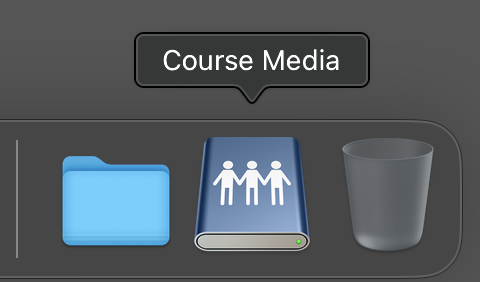
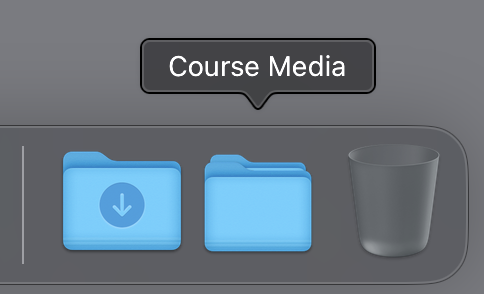
- CLICK the mounted Course Media Network Drive to see the shared folders for each course inside.
- SELECT Open in Finder to access these folders within the Finder application.
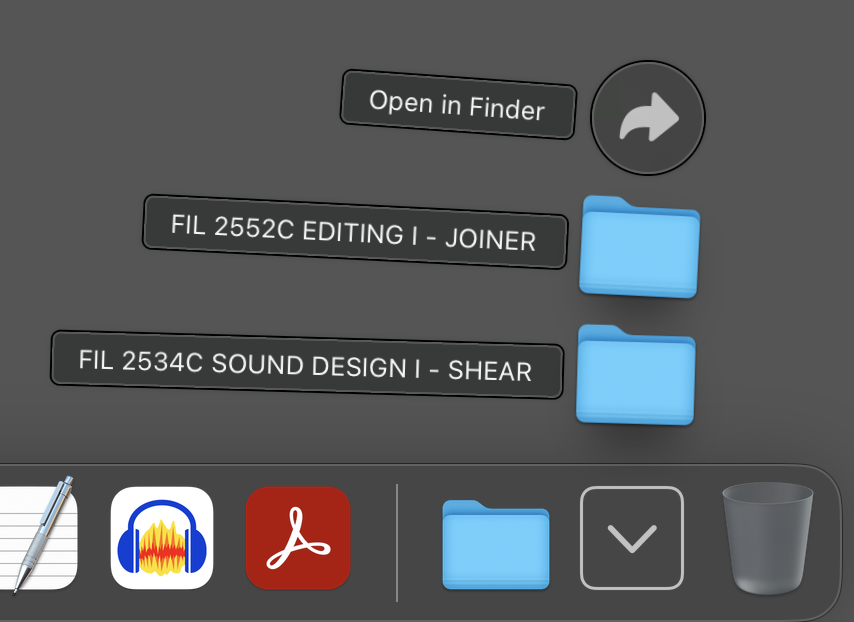
- You should now be able to navigate the stored media files as you normally would via Finder. Locate the appropriate course and instructor folder, CLICK it to open and access the desired media files.
Please note that the Course Media Network Drive should now also be visibly mounted on the Desktop. Please eject this drive when you have completed your task by dragging it to the Trash Can/Eject icon located in the Dock.
Read-Only Files
Media files stored on the Course Media Network Drive are read-only. This means that these files can be imported and used within applications, but cannot be modified or deleted unless they are downloaded locally to workstations on an external USB drive.
Registered Access
Students enrolled in FIL4566C Editing II and FIL4535C Sound Design for Film II need to access production dailies and other limited access content to complete advanced media assignments. To do this, students must login using registered credentials. Please see the Registered Access to Network Storage article for additional instructions on how to do this.